



YWF 2026
Virtual Platform Guide
Everything you need to join and stream the
YWF 2026 Virtual Meeting
This guide will help you access the virtual platform, attend live sessions, connect with global peers, industry partners, and make the most of your online meeting experience.
Whether you are joining from your desktop or mobile device, simply follow the instructions below.
BEFORE YOU BEGIN
Please ensure you have received your registration confirmation email containing:
- Your registered email address
- Your Registration Number
- Virtual Platform access link
- Mobile App download information
Important Notice:
- You must use the same email address used during registration together with your Registration Number to log in.
- YWF 2026 will be livestreamed through Vimeo. While Vimeo is accessible in most countries, some regions or organizations may restrict access due to local internet regulations or corporate/firewall security policies. We recommend that all delegates:
- Test their access to the Virtual Platform before the meeting.
- Use a stable internet connection.
- If accessing from a hospital, university, or corporate network, contact your IT department if the video player does not load.
- If Vimeo is restricted in your country or network, you may try accessing the platform through a VPN then attempt to join the livestream again.
Choose How You Want to Join
Via Desktop Access
Desktop access provides the complete virtual meeting experience.
Using your desktop, you can:
- Watch all LIVE scientific sessions
- View on-demand content (when available)
- Browse the scientific program
- View speaker profiles
- Access meeting resources
- Connect with industry partners
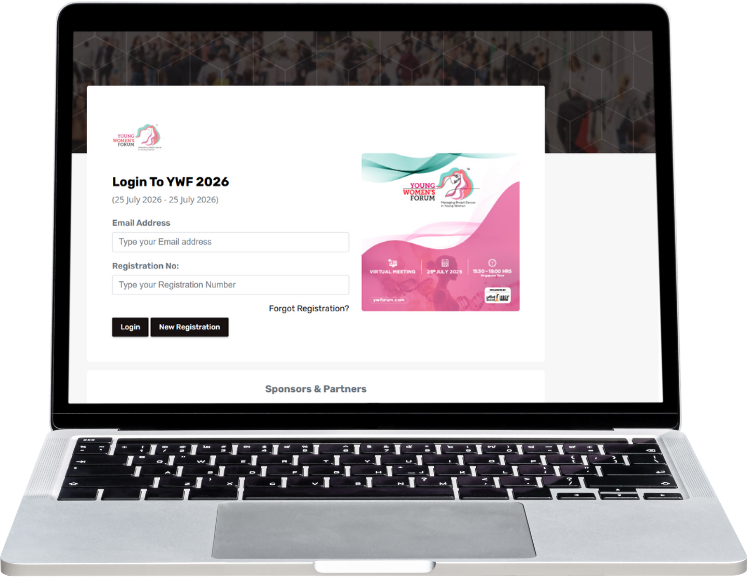
How to Login
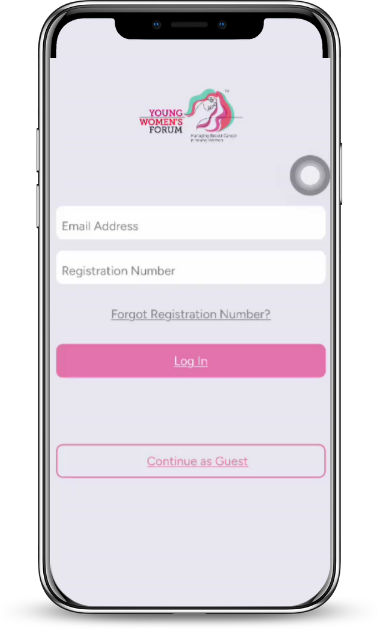
Via Mobile App Access
Prefer attending on your phone or tablet? Download the official YWF 2026 Mobile App to watch sessions anytime and anywhere.
The YWF mobile app allows you to:
Stream LIVE sessions
- Browse the scientific program
- View speaker profiles
- Access meeting resources
- Connect with industry partners
- Access meeting information
How to Login
Watch the Platform Walkthrough
New to the YWF virtual platform? Watch the step-by-step video guide below to learn how to:
- Log in successfully
- Navigate the virtual platform via desktop or mobile app
- Access LIVE sessions
- Use key platform features
During the Live Meeting
To enjoy the best viewing experience, we recommend that you:
- Log in 10–15 minutes before the start of your preferred session.
- Ensure you have a stable internet connection.
- Use the latest version of Google Chrome, Microsoft Edge, Safari, or Mozilla Firefox.
- Close unnecessary applications or browser tabs to improve streaming performance.
- If you experience buffering, refresh the page and try again.
NEED ASSISTANCE?
If you experience any technical difficulties before or during the virtual meeting, our support team will be happy to assist you.